
One connected financial-control layer around QuickBooks.
Crux connects invoice intake, approvals, job cost, and reporting into one workflow built for construction, then hands approved activity to QuickBooks®. Field, office, and accounting work from the same financial picture.
Between the work and the books.
Financial information starts in the field and on the project. Crux gives it intake, context, approvals, control, and visibility. Approved activity reaches QuickBooks, which stays the accounting system of record.
- Vendor invoices and bills
- Change orders and commitments
- Delivery and cost detail
- Intake and cost-code context
- Routed approvals and exceptions
- Job cost visibility and reporting

- Approved bills and vendor records
- General ledger and financial statements
- The books of record
QuickBooks is a registered trademark of Intuit Inc. Crux is independent and not affiliated with, endorsed by, sponsored by, or certified by Intuit.
One connected path, from capture to the books.
Financial items follow a connected path through Crux. Each step has an owner, makes something visible, and moves the item forward.
Capture
- What enters
- Vendor invoices, bills, and commitments from the field and office.
- Who acts
- The person who receives the item submits it into Crux.
- What becomes visible
- The item with its project and cost-code context.
- What moves forward
- A captured item enters the review queue.
Review and route
- What enters
- A captured item that needs a decision.
- Who acts
- Crux routes it to the responsible reviewer.
- What becomes visible
- The owner and the current status of the item.
- What moves forward
- The item reaches the right approver.
Approve or return
- What enters
- A routed item in front of its approver.
- Who acts
- The approver approves it or returns it with a reason.
- What becomes visible
- The decision and any exception, documented.
- What moves forward
- Approved items continue; returned items go back with context.
Reflect in job cost
- What enters
- An approved item with its cost coding.
- Who acts
- Crux updates committed and approved cost.
- What becomes visible
- Budget against committed and approved cost by project.
- What moves forward
- The project financial picture updates.
Report and escalate
- What enters
- The current job cost picture across projects.
- Who acts
- Leaders review variance and cost pressure.
- What becomes visible
- What needs attention, and where.
- What moves forward
- Decisions and follow-up before a surprise.
Sync to QuickBooks
- What enters
- Approved financial activity.
- Who acts
- Crux hands it to QuickBooks.
- What becomes visible
- What reached accounting, and what remains.
- What moves forward
- Approved activity lands in the books of record.
The core: five capabilities, one workflow.
This is the financial control Crux customers run today. Each capability controls one part of the workflow and connects to the next. They are not separate tools bolted together.
Room to run more of the operation on one platform.
The five capabilities above are the core financial control teams run today. The platform reaches further across the construction operation. Which modules are turned on, and how, is decided with you by tier, not assumed.
Select a module to see what it covers
Financial operations
-
Payment Applications
Progress billing to the owner, in a standard compatible format that meets bank and commercial lending draw requirements.
-
Customer Payments
Track what has been billed to the owner and what has come back in against each project.
-
Credit Card Portal
Bring company card spend into the same coding and approval path as vendor bills.
-
Insurance Compliance
Track subcontractor insurance certificates and see what has lapsed or is missing before it matters.
-
Reports
Financial and operational reporting across projects, without assembling it by hand each time.
Preconstruction and bidding
-
TakeOffs
Quantities measured from the drawings and carried into the estimate rather than re-entered.
-
Estimates
Build the estimate on cost codes, so the budget starts in the structure the job is actually run in.
-
Bid Sheet
Compare subcontractor bids side by side against the same scope.
Field operations
-
Scheduler
Plan project work and see what is committed against the calendar.
-
Permits
Track permit applications, approvals, and expiry dates by project.
-
Inspections
Record inspections and their outcomes on the project record.
-
Tasks
Assign work with an owner and a due date, visible to both the office and the field.
-
Daily Logs
Record what happened on site each day, attached to the job rather than to a person.
-
Todos
Short personal follow-ups that do not warrant a full task.
-
Project Notes
Keep project decisions and their context on the record instead of in a thread.
Visibility and oversight
-
Dashboard
One screen for the jobs, approvals, and cost movements that need attention.
-
Job Portal
A single project view that brings the financial and the field record together.
The core financial-control capabilities are what teams use today. The broader modules describe the full platform, offered by tier and confirmed during a working session. See how tiers map to scope on the pricing page, or read the full module reference.Crux does not position a capability as production ready before it is, and QuickBooks stays the accounting system of record throughout.
The same workflow, from each role.
Owner, controller, and project manager act on the same connected workflow. Each sees and controls the part that is theirs.
Needs to know where projects stand financially, across the portfolio.
Crux surfaces portfolio financial status and what changed, without waiting on several people or accounting.
- Acts on the cost pressure and approvals that need attention.
- Sees which jobs are moving off plan, and when.
- Result: fewer financial surprises, earlier.
Needs to know where every invoice sits on its way to the books.
Crux surfaces a controlled path from intake through approval to the QuickBooks handoff.
- Acts on approvals, exceptions, and the accounting handoff.
- Sees status and ownership on every item.
- Result: less chasing and less duplicate entry.
Needs to know the cost impact of approvals on the job.
Crux surfaces budget and cost-code context on every item, while the work is still moving.
- Acts on the project's approval queue and commitments.
- Sees budget against committed cost by cost code.
- Result: documented decisions, made on time.
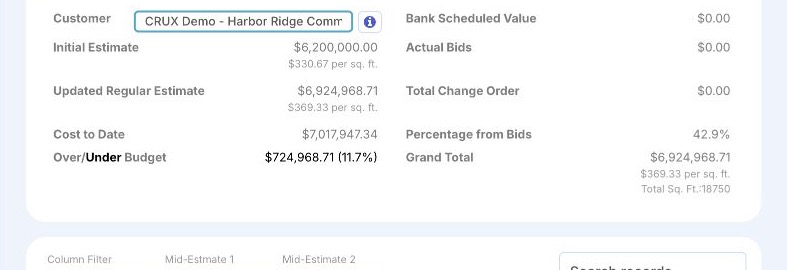
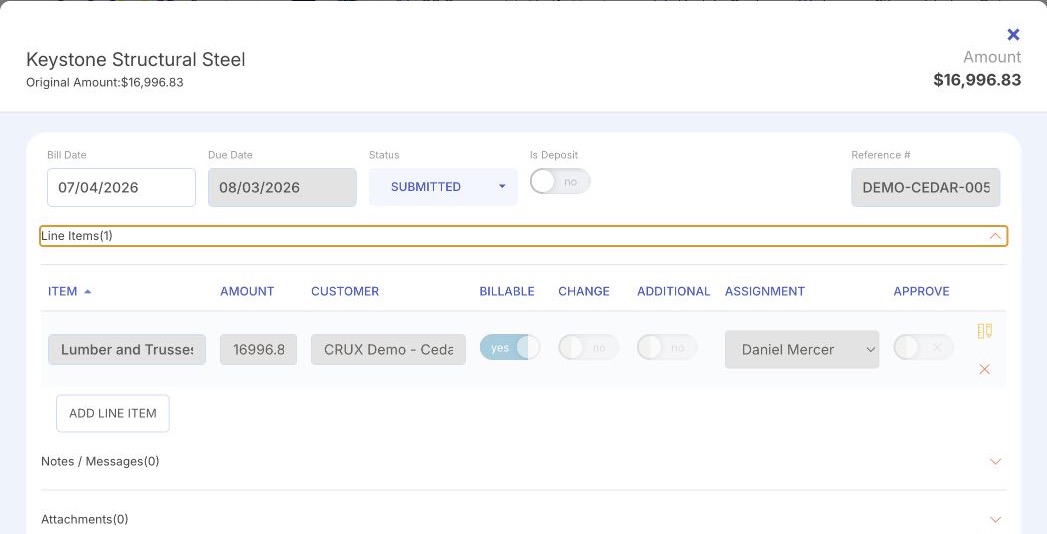
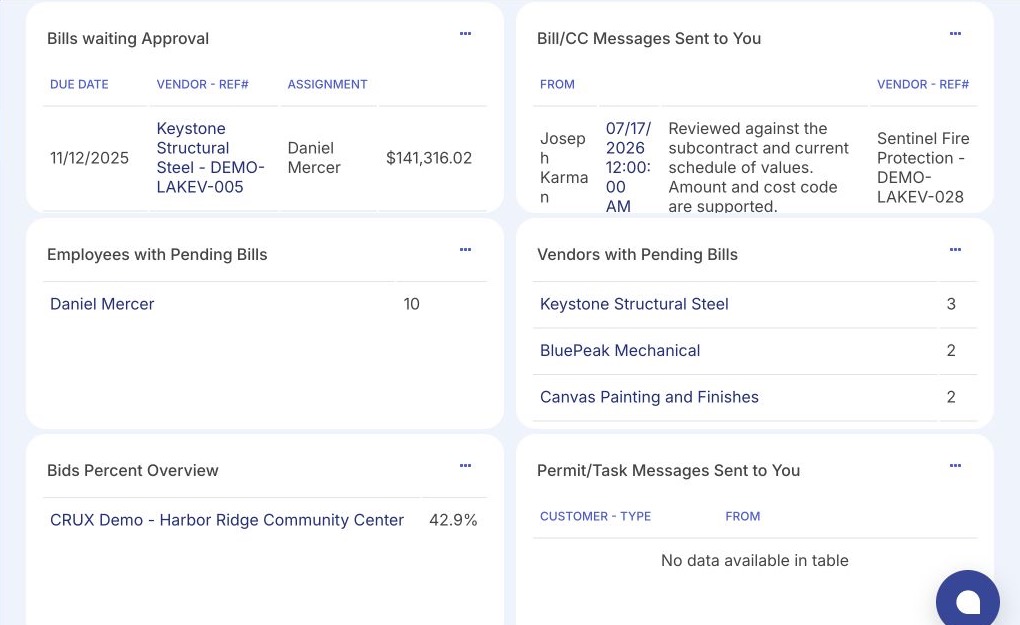
Real screens. Real decisions.
These are Crux screens with demo data. Each shows a decision and its financial context, not just that software exists.
What better financial control produces.
Financial items enter one place instead of email, text, and paper.
Every item has an owner, a status, and a documented decision.
Committed and approved cost show against budget as work moves.
Approved activity is handed to QuickBooks rather than re-keyed.
Project financials come from approved activity, not hand assembly.
Field, office, and accounting work from the same financial picture.
Go deeper into the platform.
Follow the workflow into the part most relevant to you. Each capability has its own page.
See how a project moves through Crux end to end. Review invoices, inspect project financials, approve a bill, and watch budget, activity, and QuickBooks status respond. Interactive sample environment using fictional project and financial data.
See Crux on your own projects.
Bring your current workflow. A working session maps how financial items move today and where control would help most. It is a conversation about your process, not a full data implementation.