
Bring every incoming invoice into one controlled queue.
Vendor invoices arrive through email, text, paper, and portals. Crux brings them into one queue and gives each item project context, ownership, and status, so it is ready to route, approve, and hand to QuickBooks®, which stays the accounting system of record.
Why intake quality matters to every role.
The controller runs intake day to day. Clean intake changes what the project manager and the owner can rely on.
One place to see every incoming invoice.
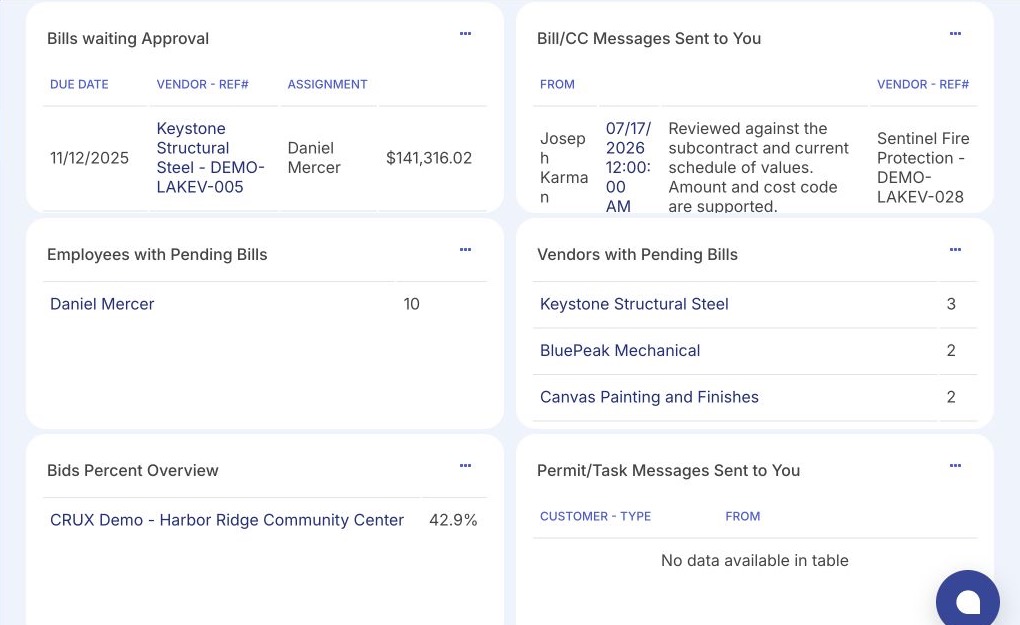
Crux surfaces the whole intake queue, what is complete, and what still needs context.
- Acts on missing information before it stalls approval.
- Sees readiness for approval and the QuickBooks handoff.
- Result: less chasing and less duplicate entry.
Only the invoices that belong to my job.
Crux surfaces project-specific items with cost and scope context, and a simple way to answer a question.
- Acts on the items that need a project answer.
- Sees cost code and scope context on each one.
- Result: clarity about what actually requires action.
Confidence that the supporting context stays attached to the Crux record.
Crux surfaces the backlog and where items are stuck, so unmanaged cost activity is visible earlier.
- Acts on bottlenecks before they slow the books.
- Sees a more reliable project financial picture.
- Result: fewer surprises from bills that were never tracked.
Invoices arrive from everywhere, with pieces missing.
A vendor invoice can reach a contractor through any of these channels. When it does, the project, the cost code, and the backup often arrive separately, or not at all.
These are the channels invoices arrive through today. Crux is the one controlled queue those items enter. How each source reaches Crux, submitted in Crux or brought in by your team, is set up for the way you work.
What still arrives incomplete.
The bill is not tied to the job it belongs to.
The line has no code, or the supporting document is elsewhere.
The same figures get keyed more than once on the way to accounting.
No one is clearly responsible for the next step.
Items wait because no one can see where they sit.
The backlog is hard to see until it becomes a problem.
One controlled path from received to ready.
Each incoming invoice moves through the same intake steps in Crux. Each step adds the context the next step needs.
Receive
- What the user sees
- A new item in the intake queue.
- What the user does
- Brings the invoice into Crux and opens it.
- What Crux records
- The item, the date received, and where it came in.
- Ready for the next step
- An item that exists in one place, not an inbox.
Identify project and vendor
- What the user sees
- The invoice next to the project and vendor fields.
- What the user does
- Confirms the vendor and assigns the project.
- What Crux records
- The vendor and the project the bill belongs to.
- Ready for the next step
- An item tied to the job it affects.
Add cost and document context
- What the user sees
- Line items, cost codes, and a place for backup.
- What the user does
- Codes the lines and attaches supporting documents.
- What Crux records
- Cost coding and the attachments kept with the item.
- Ready for the next step
- An item with the financial context an approver needs.
Flag missing information
- What the user sees
- What is still required before the item can move.
- What the user does
- Completes the missing context or asks the right person.
- What Crux records
- That the item is not yet ready, and why.
- Ready for the next step
- A complete item, or a clear reason it is waiting.
Assign or route
- What the user sees
- Who should review or approve the item.
- What the user does
- Assigns the responsible approver.
- What Crux records
- The owner of the next decision.
- Ready for the next step
- An owned item, with someone accountable.
Move into approval
- What the user sees
- A complete, owned item ready for a decision.
- What the user does
- Submits it into the approval workflow.
- What Crux records
- That intake is complete and approval is next.
- Ready for the next step
- Approval decides whether it moves forward.
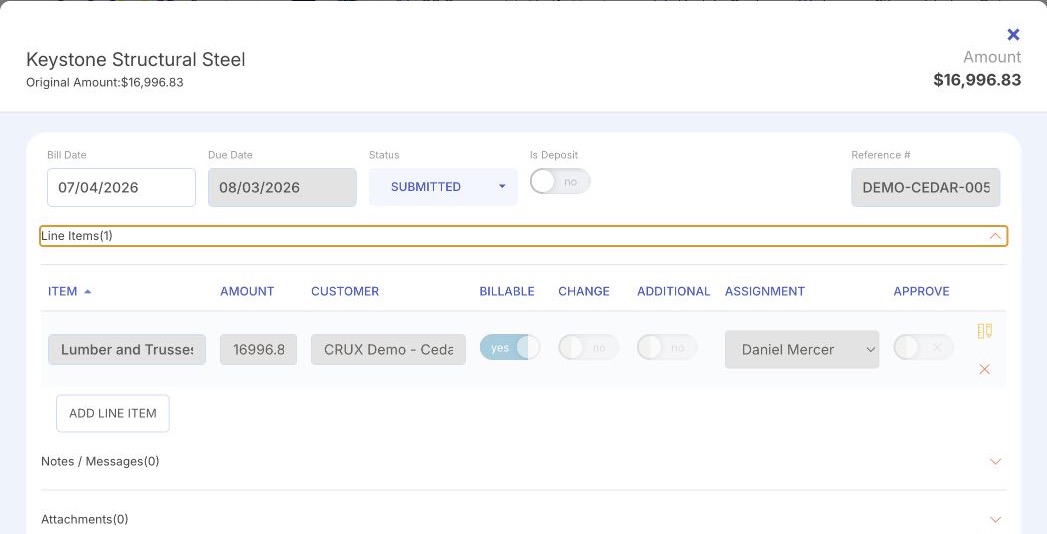
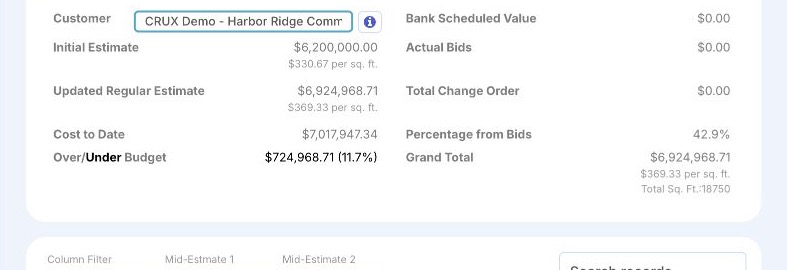
The queue, and one item inside it.
Product interface shown with illustrative data. Together these screens show a controlled queue and one invoice with its context, not a set of unrelated widgets.
A structured record, not a scanned pile.
Each item carries the fields the workflow needs. Structured intake is what makes routing, approval, job cost, and the QuickBooks handoff reliable.
Fields shown here reflect the structured intake record. Only fields the product supports are shown; the exact set is confirmed for your configuration.
Incomplete items stay visible, not buried.
When an item is not ready to approve, Crux keeps it visible with the reason, so the team can resolve it instead of losing it in an inbox.
The item has no job assigned, so it shows as needs context until one is set.
No supporting document is attached yet, so the item is not marked ready.
A line has no code, so the cost cannot land in the right place until it is set.
Because the queue is visible by vendor and reference, the team can catch a possible repeat before it is approved.
The amount sits next to the line items and any commitment, so a mismatch is easy to question.
Until an approver is assigned, the item cannot move into approval.
These are the kinds of exceptions Crux keeps visible until they are resolved. This is an illustrative reference of exception types, not a live queue.
Intake ends where approval begins.
Bill Tracker creates a complete, owned financial item. Approval then decides whether it moves forward. Once approved, the activity can affect job-cost visibility and reach QuickBooks. The intake work is what makes each of those steps reliable.
Intake prepares the bill. QuickBooks keeps the books.

- Bill Tracker controls how invoices enter and how they are prepared.
- QuickBooks remains the accounting system of record.
- Approved bills, not every incomplete incoming document, proceed into the accounting workflow.
QuickBooks is a registered trademark of Intuit Inc. Crux is independent and not affiliated with, endorsed by, sponsored by, or certified by Intuit.
See how your invoices move today.
Bring your current intake. A working session maps how invoices reach you now and where a controlled queue would help most. It is a conversation about your process, not a production setup or a data import.