
Know which invoices are waiting, who owns the decision, and what each approval changes.
Approvals should not live in text threads and inboxes. In Crux, every invoice has a visible owner, status, project, and cost context, and a documented path from waiting to decided. QuickBooks® stays downstream as the accounting system.
One decision layer, three vantage points.
The project manager decides on the job. The controller runs the queue. The owner watches for what is stuck.
Only the invoices I need to decide on.
Crux surfaces your project's items with cost and scope context, so a decision is fast and documented.
- Acts on the items assigned to you, in one place.
- Sees the cost code, backup, and budget each item affects.
- Result: approve, or return with a clear reason, on time.
The whole approval queue, and who owns each item.
Crux surfaces what is waiting and with whom, so you can resolve exceptions and prepare approved items for accounting.
- Acts on stuck items and missing context.
- Sees status and owner across every pending item.
- Result: approved items ready for the QuickBooks handoff.
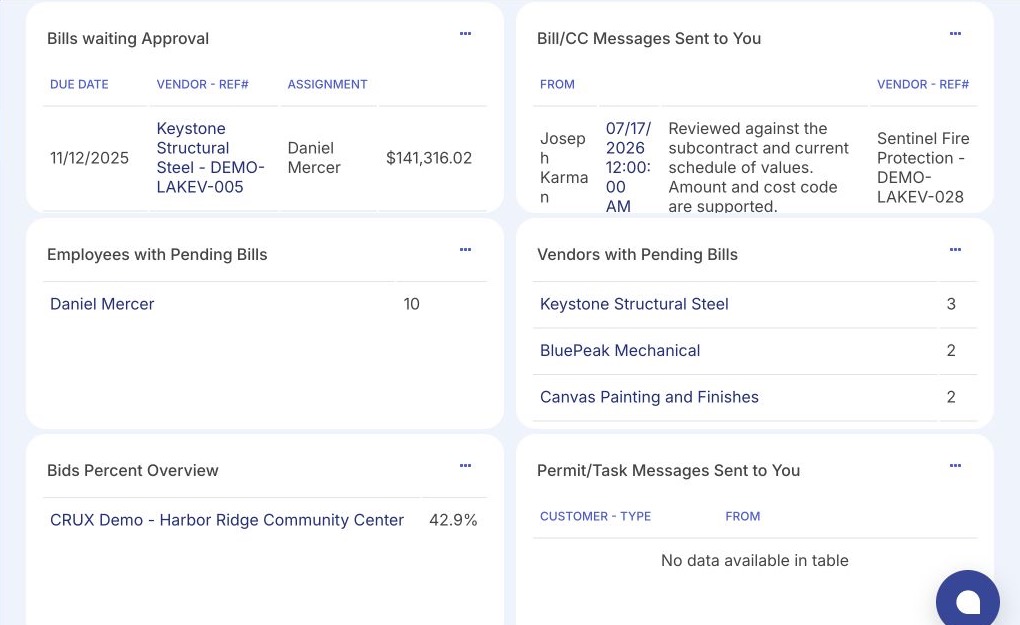
Where decisions are stuck, and who owns them.
Crux surfaces bottlenecks and the material approvals affecting project performance, with accountable owners.
- Acts on exceptions before they slow the job.
- Sees that every decision has a responsible owner.
- Result: fewer invisible commitments moving through the business.
The invoice exists. The decision is not controlled.
On many jobs, the approval itself happens off to the side. The item is real, but who decided, why, and whether it is ready for accounting is hard to see. Each of these is answered at a named point in the sequence below.
From waiting to decided, on the record.
The same six steps, in order, for every invoice. Each one closes a specific failure above: every step has an owner, and every step leaves a record.
Ready for review
- Responsible role
- Controller or office manager confirms the item is complete.
- Information visible
- Vendor, amount, project, cost code, and backup.
- Available action
- Move a complete item into the approval queue.
- Recorded result
- The item is queued for a decision.
- What happens next
- It is assigned to the responsible approver.
Assigned
- Responsible role
- The workflow owner assigns the approver.
- Information visible
- Who owns the decision, and since when.
- Available action
- Assign or reassign the responsible person.
- Recorded result
- An accountable owner for the item.
- What happens next
- The approver opens it to review.
Review context
- Responsible role
- The assigned approver, often the project manager.
- Information visible
- The invoice, its cost coding, backup, and the budget it affects.
- Available action
- Open the detail and check the item against the job.
- Recorded result
- The context the decision is based on.
- What happens next
- The approver decides.
Approve, return, or hold
- Responsible role
- The assigned approver.
- Information visible
- Everything needed to decide, in one place.
- Available action
- Approve, return for missing information, or hold for clarification.
- Recorded result
- The decision, with a reason when it is returned or held.
- What happens next
- Approved items move on; others go back with context.
Record decision
- Responsible role
- Crux records what the approver did.
- Information visible
- Who decided, when, and why.
- Available action
- Read the decision trail on the item.
- Recorded result
- A documented, traceable decision.
- What happens next
- The result affects job cost and the accounting handoff.
Reflect downstream
- Responsible role
- Crux updates the project view.
- Information visible
- Approved cost against budget by project.
- Available action
- See the budget impact of the decision.
- Recorded result
- An approved item ready for the QuickBooks handoff.
- What happens next
- The approved bill proceeds toward QuickBooks.
A decision you can stand behind.
A defensible approval carries the financial context and the reason behind it. Crux keeps them on the item, not in a separate thread.
Only fields the product supports are shown; the exact set and any additional detail are confirmed for your configuration.
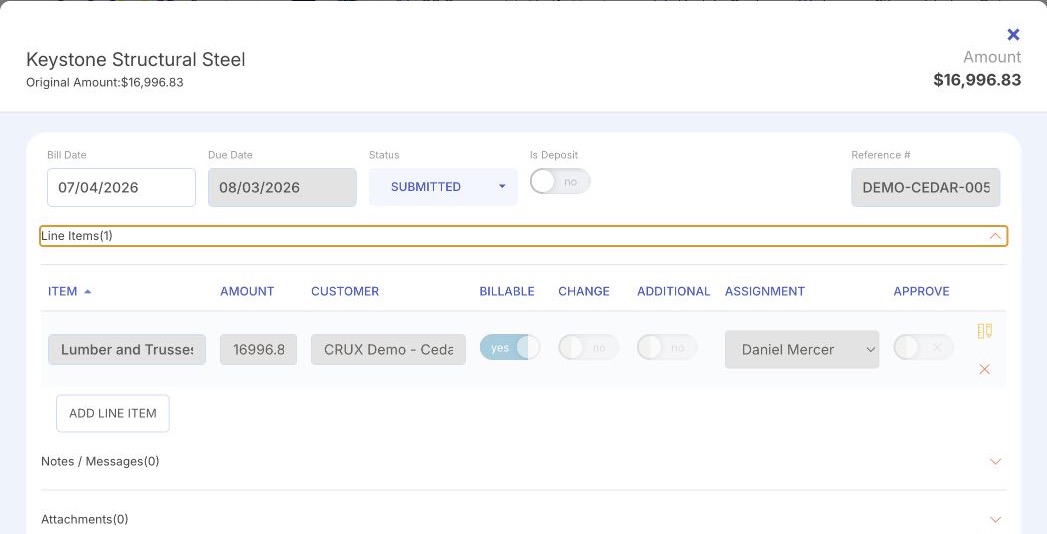
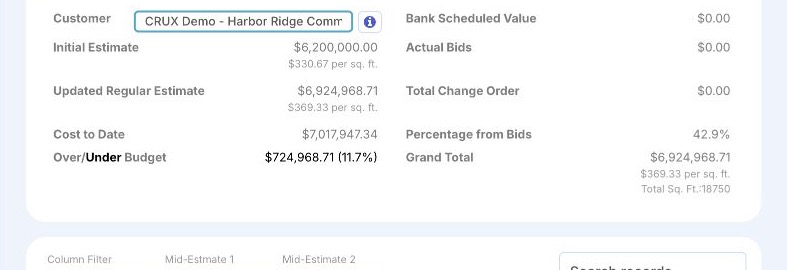
The decision, and what it changes.
Product interface shown with illustrative data. One screen shows an invoice ready for a decision; the other shows the budget that decision affects.
A controlled decision is more than a yes button.
Each item carries a clear state, an owner, and a reason. The state tells the next person exactly what happened.
- Who acts
- Waiting on the assigned approver.
- What is recorded
- How long it has been waiting, and with whom.
- The next person sees
- A pending item, not a silent gap.
- Moves forward
- On the next decision.
- Who acts
- The assigned approver.
- What is recorded
- An optional comment on why it was approved.
- The next person sees
- A decided item, ready for the accounting handoff.
- Moves forward
- Yes, toward job cost and QuickBooks.
- Who acts
- The approver returns it.
- What is recorded
- What is missing or needs to change.
- The next person sees
- The item back in intake, with the reason attached.
- Moves forward
- No, until the context is completed.
- Who acts
- The approver holds the item.
- What is recorded
- The question that must be answered first.
- The next person sees
- A held item that stays visible in Crux and is not approved by default.
- Moves forward
- Not yet; it stays visible until resolved.
- Who acts
- The workflow owner or approver.
- What is recorded
- Who now owns the decision.
- The next person sees
- The item on the correct approver's queue.
- Moves forward
- Continues with a new owner.
Select a state to see who acts and what it changes. These are the decision states covered here; approval routing rules, thresholds, and any multi-level structure are configured for your organization and confirmed during setup.
What an approval changes financially.
An approval is a financial event. Follow one decision from the record to the project picture.
The assigned approver approves the item, with a reason on the record.
ApprovedApproved cost is reflected against the project budget, kept distinct from committed and posted cost.
Leadership sees where the project stands, with the decision and its context on the record.
See budget vs actualReceived invoices, commitments, approved cost, and posted accounting stay distinct stages, not the same number. How each is represented against budget is confirmed for your configuration. Product interface shown with illustrative data.
Crux decides. QuickBooks keeps the books.
The decision and its context live in Crux. Approved bills are prepared for the next accounting step and proceed into the accounting workflow. QuickBooks remains the system of record.
- Review and context
- Approval decision and exceptions
- Job-cost visibility

- Accounts payable and ledger
- The accounting record
- Financial statements
QuickBooks is a registered trademark of Intuit Inc. Crux is independent and not affiliated with, endorsed by, sponsored by, or certified by Intuit.
See how approvals move through your jobs.
A working session maps your current approval path, finds where ownership or context breaks down, and shows how Crux creates a controlled decision trail. It is a conversation about your process, not an implementation or a data migration.